Logo on colored background

Glazily

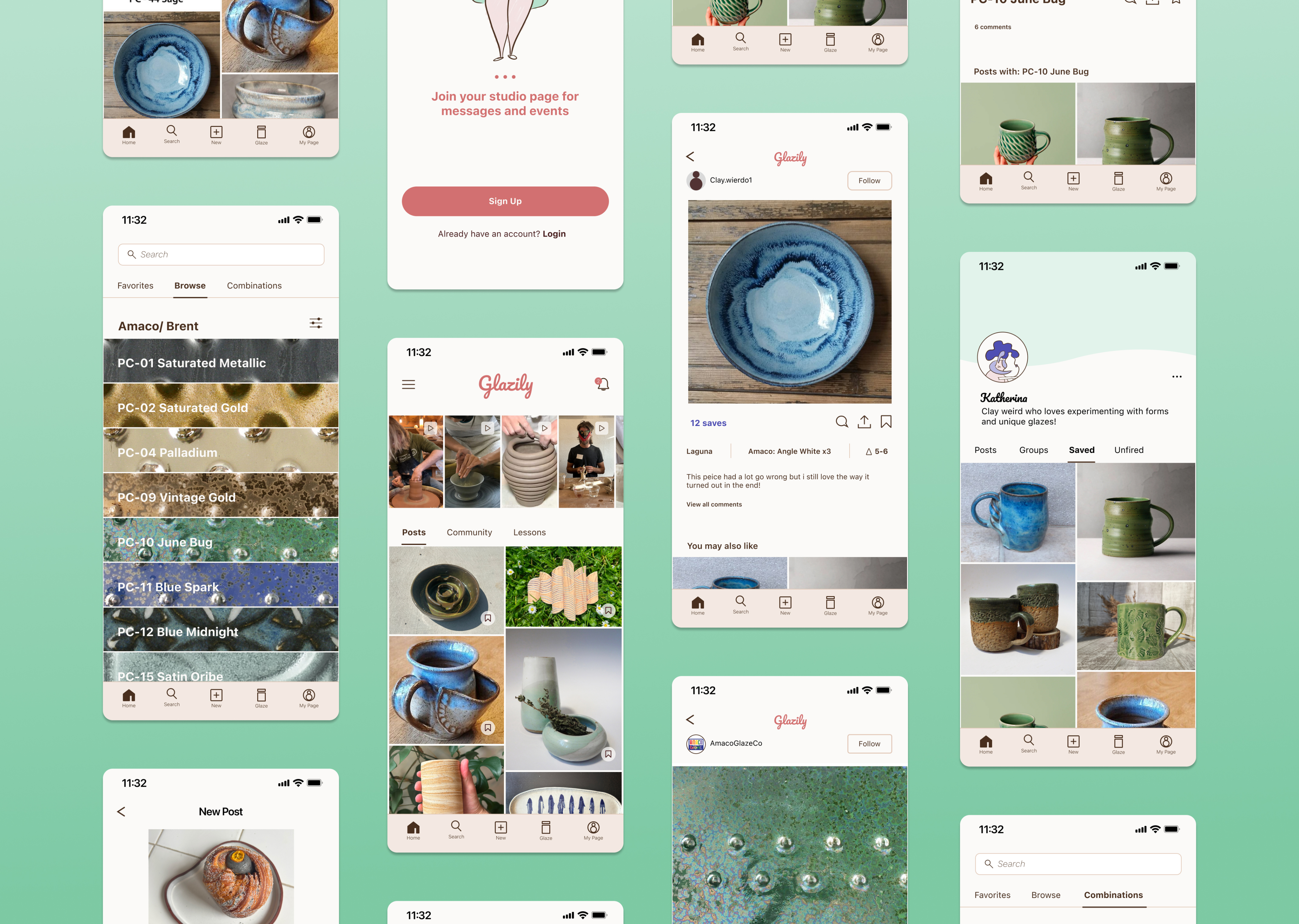
Artillery AG, a ceramics studio located in the bustling Mission District of San Francisco, sought to build a member portal to enhance communication between members and management. We reviewed various communication platforms and methods, but realized that before addressing how information was relayed, we needed to determine what information members wanted to know. So we asked!

Question

“What information would be helpful for the studio to provide?”

Person at standing desk working on laptop

Responses:

  • Kiln schedule
  • Glaze combinations
  • Slab building tips
  • Wheel throwing tips
  • Events in the space
  • Clay recycling information
  • Colored clay information
  • Tool guide
  • Equipment information, e.g. clay extruder
  • Highlighting inspirational work of members

Key Insight

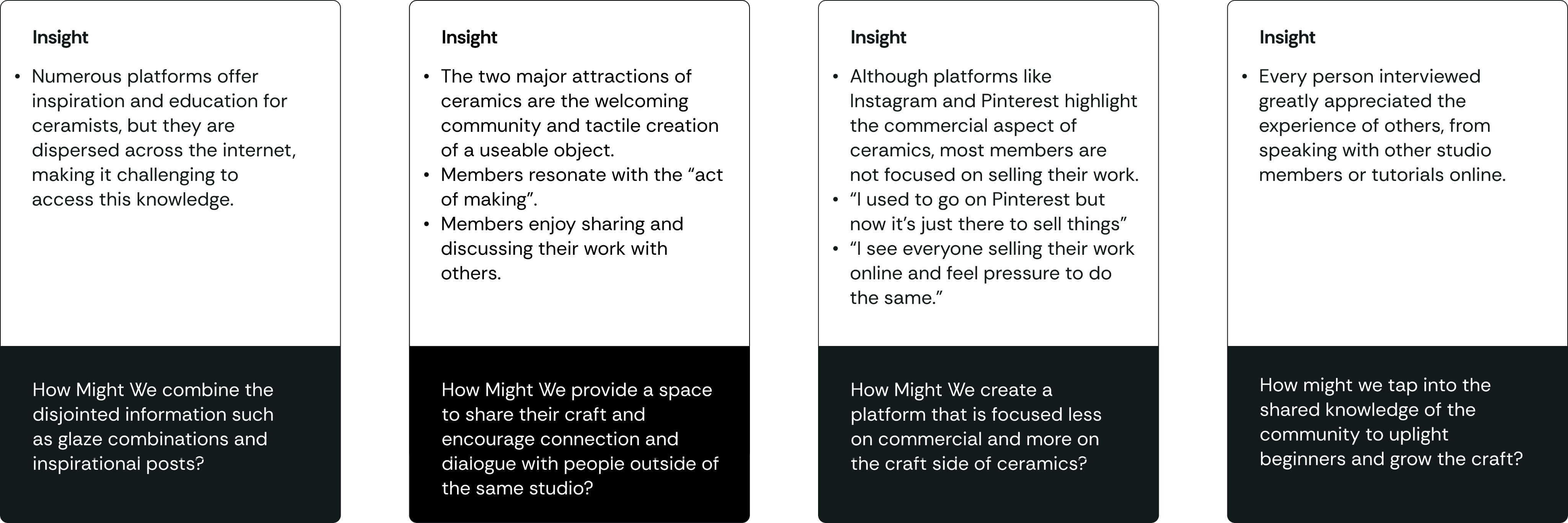
While items such as the kiln schedule and event list were expected to be the main concerns, members expressed greater interest in learning about the foundational skills and tips rather than the studio's day-to-day operations.

Hypothesis

Confident in the universal thirst for knowledge, the client expanded the project's scope to educate and inspire the broader ceramics community, while still addressing their small studio communication.

Challenges

Person with iPad
  • Actively engaging enough users to contribute, while competing with apps like instagram and Pinterest for attention?

  • Understanding the incentives for various parties to contribute to the app. A studio owner, a youtube instructor, and a hobby ceramist will engage the platform for different reasons.

  • Working with ceramic brands to ensure accurate and current information of their products.

Understanding the Users

To begin this journey I interviewed 20 ceramicists from Artillery and other studios in San Francisco. I was particularly interested in understanding how they currently access information and what personally motivates them in their craft.

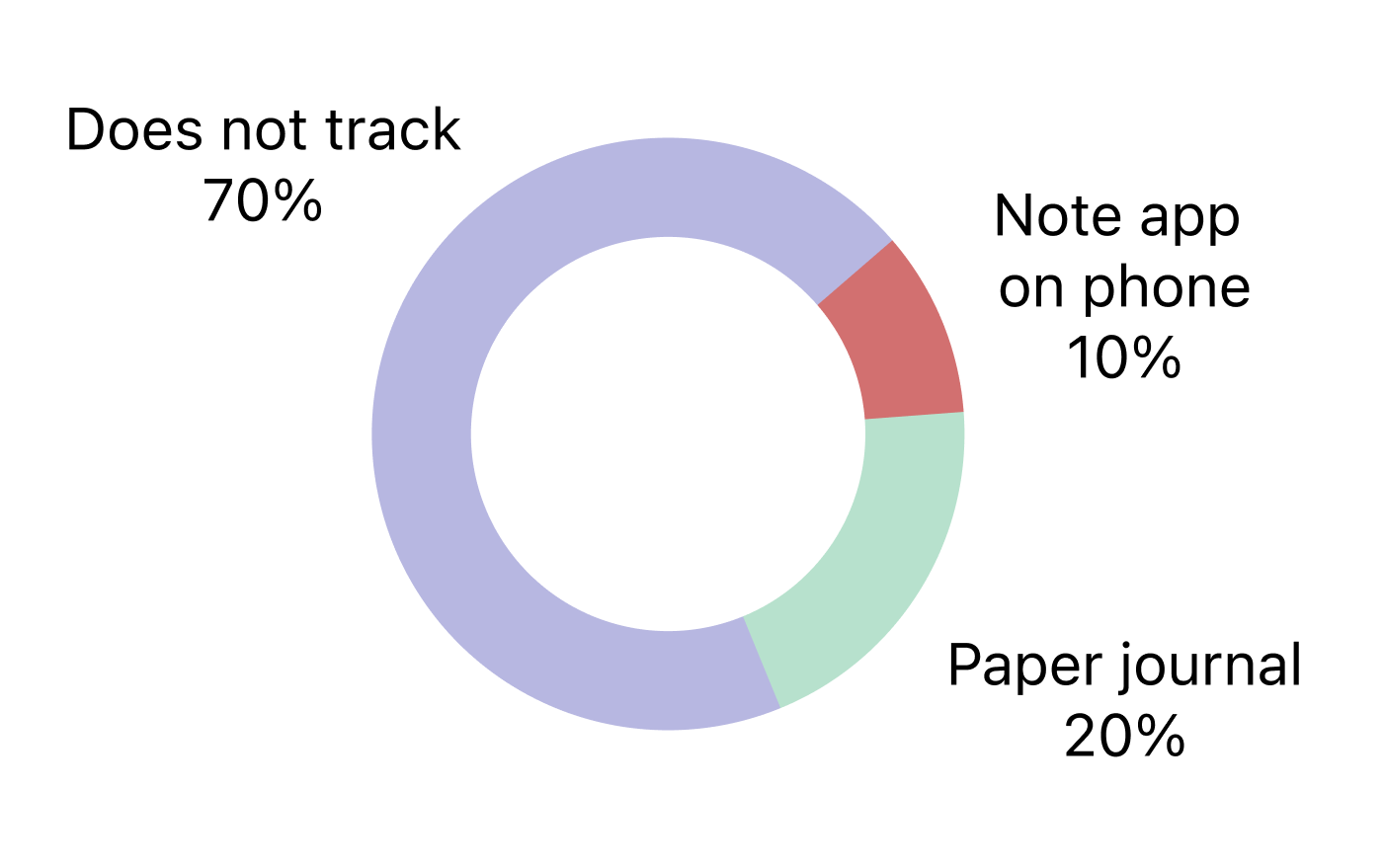
How do you track the progress

of your pieces?
Person sitting by window working on tablet

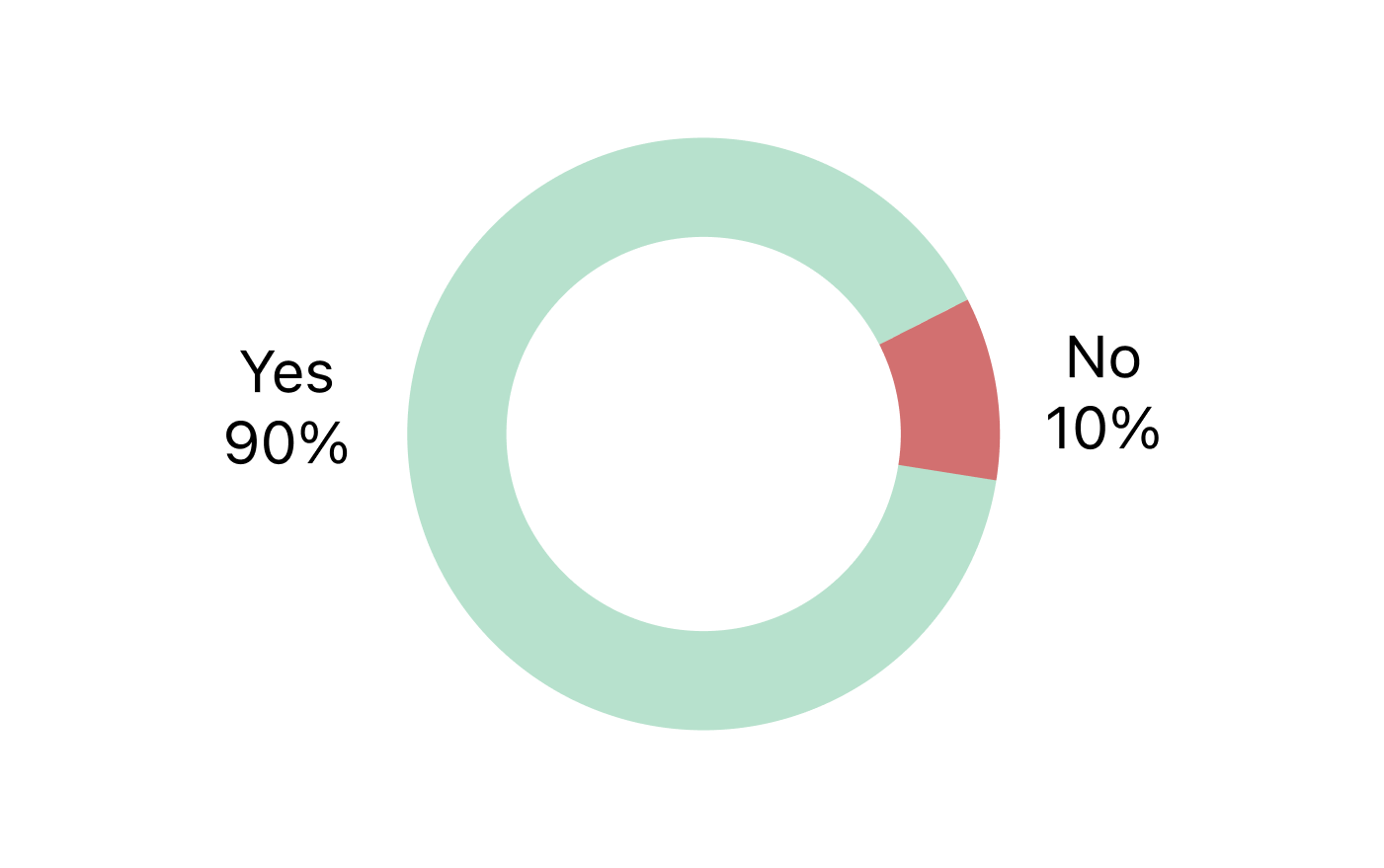
Do you follow other ceramicists online?
Person sitting on floor working on laptop

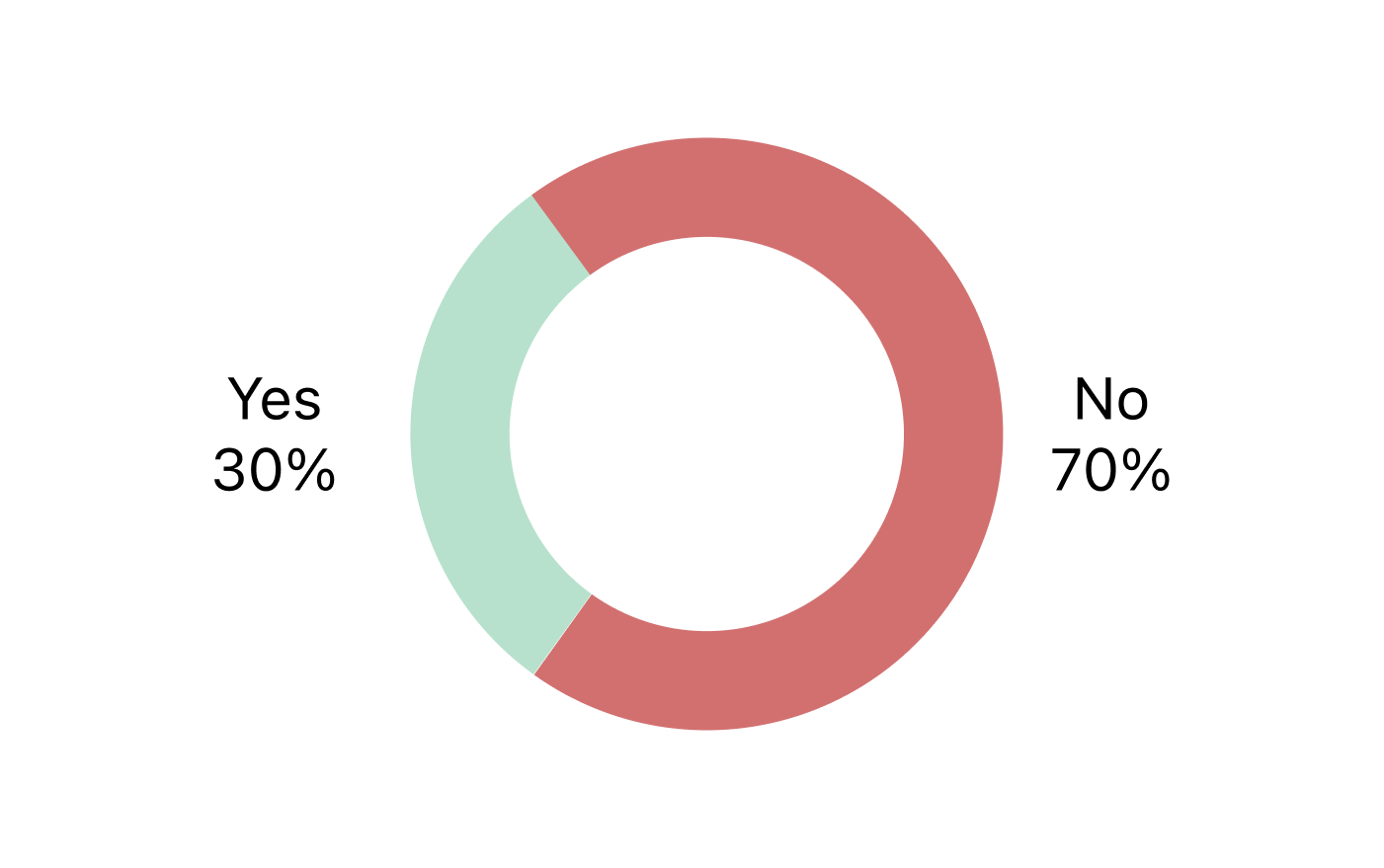
Are you focused on selling?

Person sitting on floor working on laptop

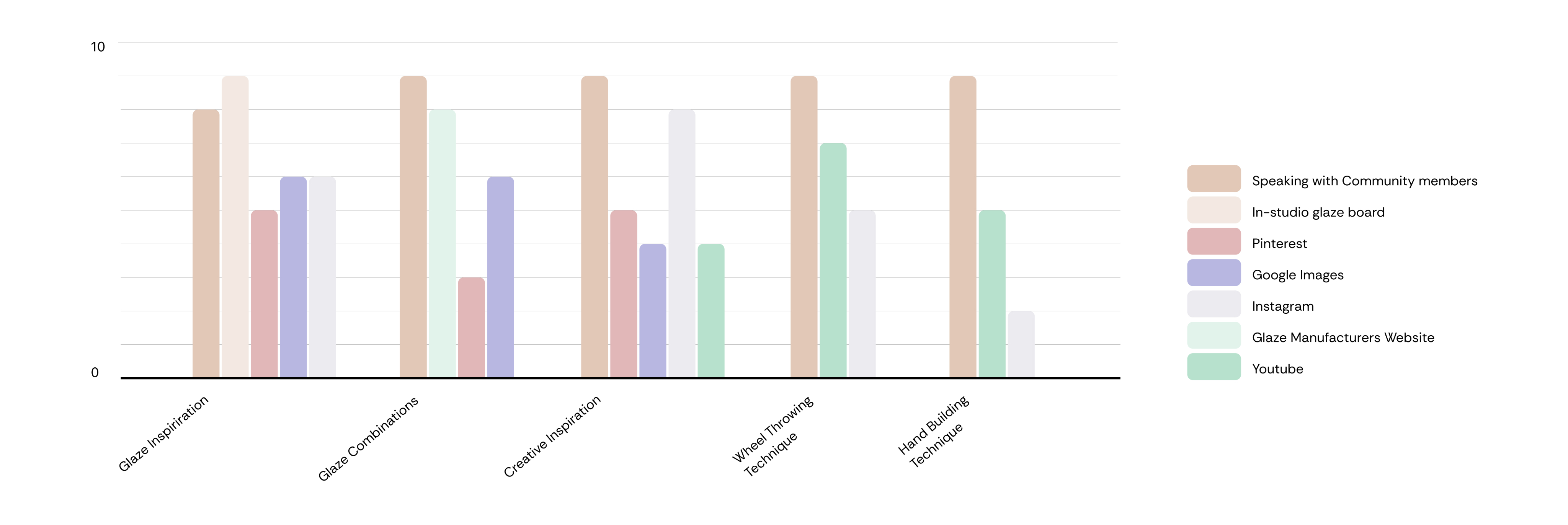
What resources do you use when looking for each of the following categories?
Person sitting on floor working on laptop

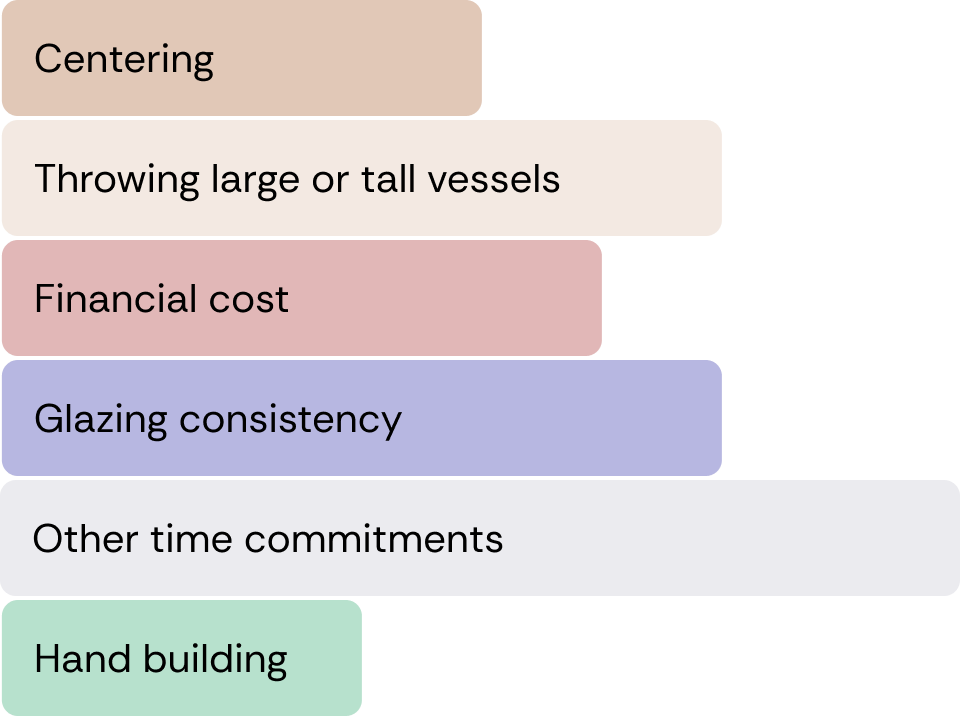
What are the biggest challenges you face in ceramics?
Person sitting on floor working on laptop

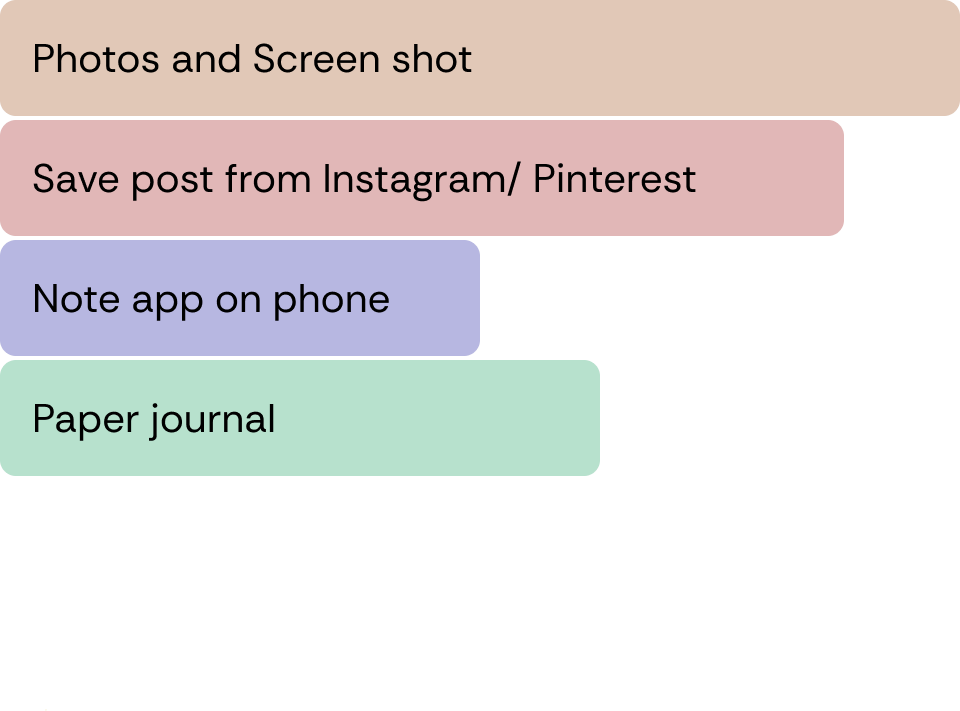
How do you save/ document things that inspire you?
Person sitting on floor working on laptop

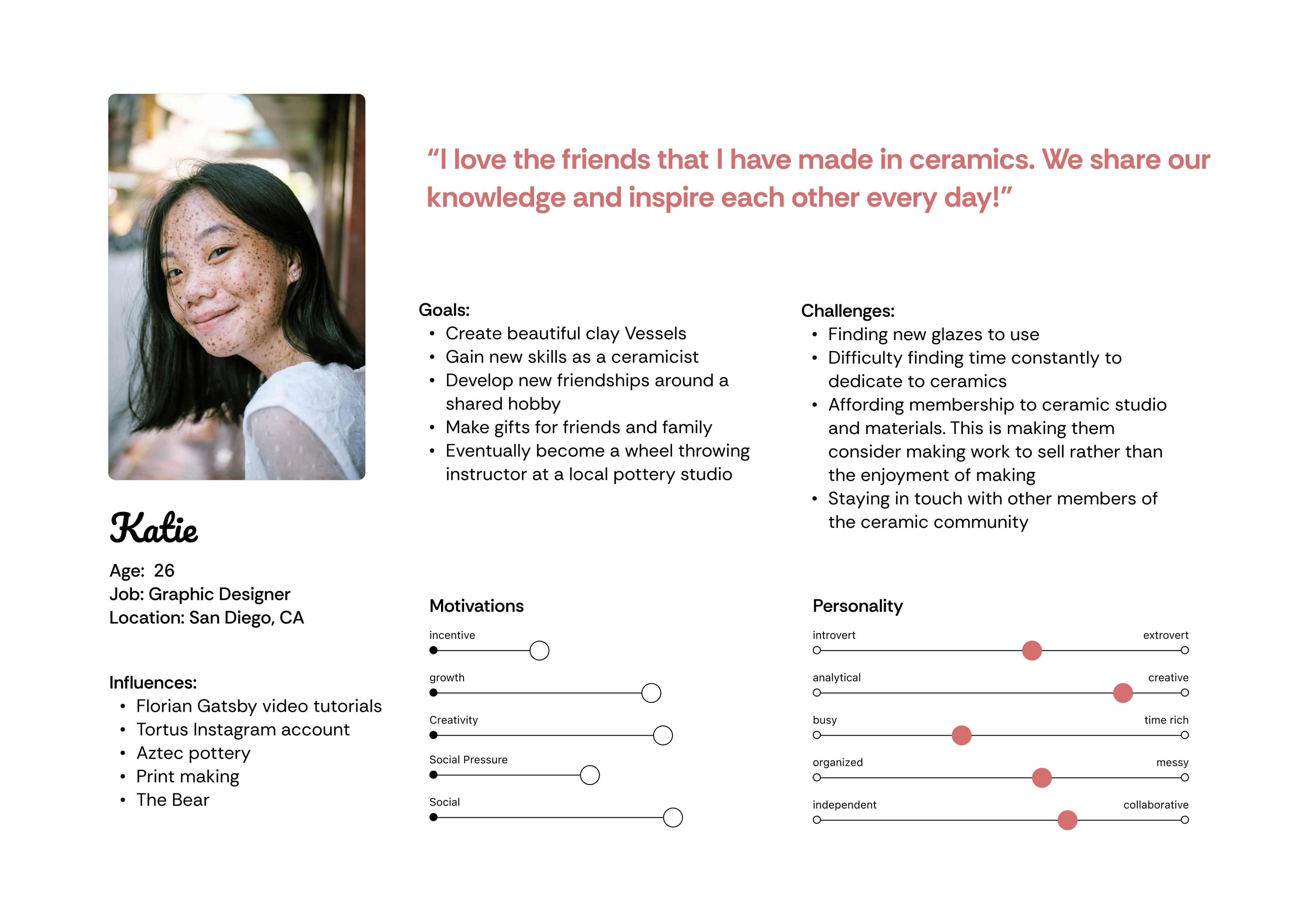
User Persona A: Hobby Ceramisist

Person with iPad

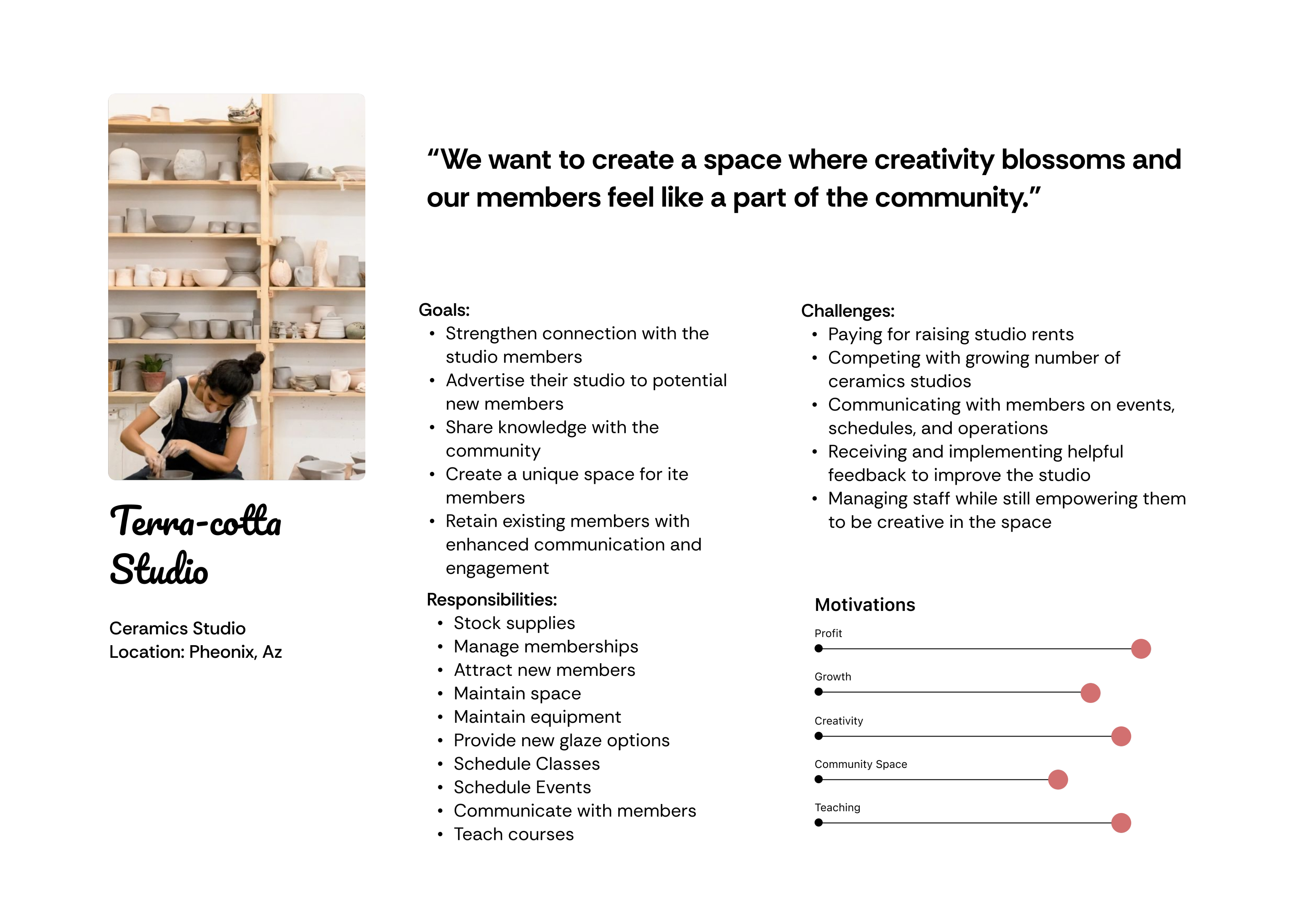
User Persona B: Ceramic Studio

Person with iPad

User Persona B: Ceramic Studio

Person with iPad

What Worked

  1. Visual-First Interface
  • Designers make material decisions primarily through visual evaluation, not technical specs.

  • Organizing the product around imagery (instead of spreadsheets or tables) made the system feel natural and intuitive.

  • This visual-first structure aligned with how architects and interior designers actually work.
  1. Visual-First Interface
  • Designers make material decisions primarily through visual evaluation, not technical specs.

  • Organizing the product around imagery (instead of spreadsheets or tables) made the system feel natural and intuitive.

  • This visual-first structure aligned with how architects and interior designers actually work.
  1. Comprehensive Material Library
  • Users strongly valued having a single place to store and organize material information, replacing scattered folders and PDFs.

  • The library helped teams to reference previously vetted materials instead of starting from scratch.

  • Making past material decisions searchable and visible reduced repeated research and helped designers quickly understand what had already been specified or approved.
  1. Comprehensive Material Library
  • Users strongly valued having a single place to store and organize material information, replacing scattered folders and PDFs.

  • The library helped teams to reference previously vetted materials instead of starting from scratch.

  • Making past material decisions searchable and visible reduced repeated research and helped designers quickly understand what had already been specified or approved.
  1. Browser Extension Adoption
  • The browser extension became one of the most loved features.

  • It allowed users to capture manufacturer data while researching products online, saving significant manual entry time.

  • The extension acted as a great bridge between everyday product research and the Hearth platform.

  • Note: workflow took multiple iterations as users found early versions clunky and non-intuitive (see “What didn’t” section)
  1. Browser Extension Adoption
  • The browser extension became one of the most loved features.

  • It allowed users to capture manufacturer data while researching products online, saving significant manual entry time.

  • The extension acted as a great bridge between everyday product research and the Hearth platform.

  • Note: workflow took multiple iterations as users found early versions clunky and non-intuitive (see “What didn’t” section)

What Didn’t

  1. Friction-Heavy Image Capture

  • Early versions required multiple steps to attach inspiration images.

  • Users expected simple drag-and-drop or copy-paste behavior.

  • After simplifying image capture to match common interface patterns, usability improved significantly.
  1. Visual-First Interface
  • Designers make material decisions primarily through visual evaluation, not technical specs.

  • Organizing the product around imagery (instead of spreadsheets or tables) made the system feel natural and intuitive.

  • This visual-first structure aligned with how architects and interior designers actually work.
  1. Comprehensive Material Library
  • Most firms already generate schedules within their design software.

  • Because Hearth lacked direct integrations with those tools, creating schedules inside the platform felt like an extra step.

  • For the feature to provide real value, material data needed to flow directly into existing design workflows.
  1. Comprehensive Material Library
  • Users strongly valued having a single place to store and organize material information, replacing scattered folders and PDFs.

  • The library helped teams to reference previously vetted materials instead of starting from scratch.

  • Making past material decisions searchable and visible reduced repeated research and helped designers quickly understand what had already been specified or approved.

Case Study in Progress

Logo on colored background

Glazily

Artillery AG, a ceramics studio located in the bustling Mission District of San Francisco, sought to build a member portal to enhance communication between members and management. We reviewed various communication platforms and methods, but realized that before addressing how information was relayed, we needed to determine what information members wanted to know. So we asked!

Question

“What information would be helpful for the studio to provide?”

Person at standing desk working on laptop

Responses:

  • Kiln schedule
  • Glaze combinations
  • Slab building tips
  • Wheel throwing tips
  • Events in the space
  • Clay recycling information
  • Colored clay information
  • Tool guide
  • Equipment information, e.g. clay extruder
  • Highlighting inspirational work of members

Key Insight

While items such as the kiln schedule and event list were expected to be the main concerns, members expressed greater interest in learning about the foundational skills and tips rather than the studio's day-to-day operations.

Hypothesis

Confident in the universal thirst for knowledge, the client expanded the project's scope to educate and inspire the broader ceramics community, while still addressing their small studio communication.

Challenges

Person with iPad
  • Actively engaging enough users to contribute, while competing with apps like instagram and Pinterest for attention?

  • Understanding the incentives for various parties to contribute to the app. A studio owner, a youtube instructor, and a hobby ceramist will engage the platform for different reasons.

  • Working with ceramic brands to ensure accurate and current information of their products.

Understanding the Users

To begin this journey I interviewed 20 ceramicists from Artillery and other studios in San Francisco. I was particularly interested in understanding how they currently access information and what personally motivates them in their craft.

How do you track the progress

of your pieces?

Person sitting by window working on tablet

Do you follow other ceramicists online?

Person sitting on floor working on laptop

Is selling your work important to you?

Person sitting on floor working on laptop

What resources do you use when looking for each of the following categories?

Person sitting on floor working on laptop

What are the biggest challenges you face in ceramics?

Person sitting on floor working on laptop

How do you save/ document things that inspire you?

Person sitting on floor working on laptop

User Persona A: Hobby Ceramisist

Person with iPad

User Persona B: Ceramic Studio

Person with iPad

User Persona B: Ceramic Studio

Person with iPad

What Worked

  1. Visual-First Interface
  • Designers make material decisions primarily through visual evaluation, not technical specs.

  • Organizing the product around imagery (instead of spreadsheets or tables) made the system feel natural and intuitive.

  • This visual-first structure aligned with how architects and interior designers actually work.
  1. Visual-First Interface
  • Designers make material decisions primarily through visual evaluation, not technical specs.

  • Organizing the product around imagery (instead of spreadsheets or tables) made the system feel natural and intuitive.

  • This visual-first structure aligned with how architects and interior designers actually work.
  1. Comprehensive Material Library
  • Users strongly valued having a single place to store and organize material information, replacing scattered folders and PDFs.

  • The library helped teams to reference previously vetted materials instead of starting from scratch.

  • Making past material decisions searchable and visible reduced repeated research and helped designers quickly understand what had already been specified or approved.
  1. Comprehensive Material Library
  • Users strongly valued having a single place to store and organize material information, replacing scattered folders and PDFs.

  • The library helped teams to reference previously vetted materials instead of starting from scratch.

  • Making past material decisions searchable and visible reduced repeated research and helped designers quickly understand what had already been specified or approved.
  1. Browser Extension Adoption
  • The browser extension became one of the most loved features.

  • It allowed users to capture manufacturer data while researching products online, saving significant manual entry time.

  • The extension acted as a great bridge between everyday product research and the Hearth platform.

  • Note: workflow took multiple iterations as users found early versions clunky and non-intuitive (see “What didn’t” section)
  1. Browser Extension Adoption
  • The browser extension became one of the most loved features.

  • It allowed users to capture manufacturer data while researching products online, saving significant manual entry time.

  • The extension acted as a great bridge between everyday product research and the Hearth platform.

  • Note: workflow took multiple iterations as users found early versions clunky and non-intuitive (see “What didn’t” section)
  1. Visual-First Interface
  • Designers make material decisions primarily through visual evaluation, not technical specs.

  • Organizing the product around imagery (instead of spreadsheets or tables) made the system feel natural and intuitive.

  • This visual-first structure aligned with how architects and interior designers actually work.

What Didn’t

  1. Friction-Heavy Image Capture

  • Early versions required multiple steps to attach inspiration images.

  • Users expected simple drag-and-drop or copy-paste behavior.

  • After simplifying image capture to match common interface patterns, usability improved significantly.
  1. Comprehensive Material Library
  • Users strongly valued having a single place to store and organize material information, replacing scattered folders and PDFs.

  • The library helped teams to reference previously vetted materials instead of starting from scratch.

  • Making past material decisions searchable and visible reduced repeated research and helped designers quickly understand what had already been specified or approved.
  1. Comprehensive Material Library
  • Most firms already generate schedules within their design software.

  • Because Hearth lacked direct integrations with those tools, creating schedules inside the platform felt like an extra step.

  • For the feature to provide real value, material data needed to flow directly into existing design workflows.

Case Study in Progress

Logo on colored background

Glazily

Artillery AG, a ceramics studio located in the bustling Mission District of San Francisco, sought to build a member portal to enhance communication between members and management. We reviewed various communication platforms and methods, but realized that before addressing how information was relayed, we needed to determine what information members wanted to know. So we asked!

Question

“What information would be helpful for the studio to provide?”

Responses:

  • Kiln schedule
  • Glaze combinations
  • Slab building tips
  • Wheel throwing tips
  • Events in the space
  • Clay recycling information
  • Colored clay information
  • Tool guide
  • Equipment information, e.g. clay extruder
  • Highlighting inspirational work of members

Person at standing desk working on laptop

Key Insight

While items such as the kiln schedule and event list were expected to be the main concerns, members expressed greater interest in learning about the foundational skills and tips rather than the studio's day-to-day operations.

Hypothesis

Confident in the universal thirst for knowledge, the client expanded the project's scope to educate and inspire the broader ceramics community, while still addressing their small studio communication.

Challenges

Person with iPad
  • Actively engaging enough users to contribute, while competing with apps like instagram and Pinterest for attention?

  • Understanding the incentives for various parties to contribute to the app. A studio owner, a youtube instructor, and a hobby ceramist will engage the platform for different reasons.

  • Working with ceramic brands to ensure accurate and current information of their products.

Understanding the Users

To begin this journey I interviewed 20 ceramicists from Artillery and other studios in San Francisco. I was particularly interested in understanding how they currently access information and what personally motivates them in their craft.

How do you track the progress

of your pieces?

Person sitting by window working on tablet

Do you follow other ceramicists online?

Person sitting on floor working on laptop

Are you focused on selling?

Person sitting on floor working on laptop

What resources do you use when looking for each of the following categories?

Person sitting on floor working on laptop

What are the biggest challenges you face in ceramics?

Person sitting on floor working on laptop

How do you save/ document things that inspire you?

Person sitting on floor working on laptop

User Persona A: Hobby Ceramists

Person with iPad

User Persona B: Ceramic Studio

Person with iPad

User Persona B: Ceramic Studio

Person with iPad

What Worked

  1. Visual-First Interface
  • Designers make material decisions primarily through visual evaluation, not technical specs.

  • Organizing the product around imagery (instead of spreadsheets or tables) made the system feel natural and intuitive.

  • This visual-first structure aligned with how architects and interior designers actually work.
  1. Visual-First Interface
  • Designers make material decisions primarily through visual evaluation, not technical specs.

  • Organizing the product around imagery (instead of spreadsheets or tables) made the system feel natural and intuitive.

  • This visual-first structure aligned with how architects and interior designers actually work.
  1. Comprehensive Material Library
  • Users strongly valued having a single place to store and organize material information, replacing scattered folders and PDFs.

  • The library helped teams to reference previously vetted materials instead of starting from scratch.

  • Making past material decisions searchable and visible reduced repeated research and helped designers quickly understand what had already been specified or approved.
  1. Comprehensive Material Library
  • Users strongly valued having a single place to store and organize material information, replacing scattered folders and PDFs.

  • The library helped teams to reference previously vetted materials instead of starting from scratch.

  • Making past material decisions searchable and visible reduced repeated research and helped designers quickly understand what had already been specified or approved.
  1. Browser Extension Adoption
  • The browser extension became one of the most loved features.

  • It allowed users to capture manufacturer data while researching products online, saving significant manual entry time.

  • The extension acted as a great bridge between everyday product research and the Hearth platform.

  • Note: workflow took multiple iterations as users found early versions clunky and non-intuitive (see “What didn’t” section)
  1. Browser Extension Adoption
  • The browser extension became one of the most loved features.

  • It allowed users to capture manufacturer data while researching products online, saving significant manual entry time.

  • The extension acted as a great bridge between everyday product research and the Hearth platform.

  • Note: workflow took multiple iterations as users found early versions clunky and non-intuitive (see “What didn’t” section)
  1. Visual-First Interface
  • Designers make material decisions primarily through visual evaluation, not technical specs.

  • Organizing the product around imagery (instead of spreadsheets or tables) made the system feel natural and intuitive.

  • This visual-first structure aligned with how architects and interior designers actually work.

What Didn’t

  1. Friction-Heavy Image Capture

  • Early versions required multiple steps to attach inspiration images.

  • Users expected simple drag-and-drop or copy-paste behavior.

  • After simplifying image capture to match common interface patterns, usability improved significantly.
  1. Comprehensive Material Library
  • Users strongly valued having a single place to store and organize material information, replacing scattered folders and PDFs.

  • The library helped teams to reference previously vetted materials instead of starting from scratch.

  • Making past material decisions searchable and visible reduced repeated research and helped designers quickly understand what had already been specified or approved.
  1. Comprehensive Material Library
  • Most firms already generate schedules within their design software.

  • Because Hearth lacked direct integrations with those tools, creating schedules inside the platform felt like an extra step.

  • For the feature to provide real value, material data needed to flow directly into existing design workflows.

Case Study in Progress

Robert Goren

Contact

Architecture

01

Hearth

02

Product Design

03

Installation

04

Arts

05